


Mirror Link Phone Car Screen
3.823.00 Reviews
App Specs
- Version
- 6.0
- Updated On
- License
- Free
- Downloads
- 50,000+
- Developer
- AIOO inc
- Categories
- Libraries & Demo
- Platform
- Android
Screenshots
 Analysis by AppCompare
Before installing a car-screen mirroring app, I would first check what the vehicle already supports and what I actually want to see while driving. Mirror Link Phone Car Screen is most appealing when the car has a compatible display and the goal is to show phone content on it. It is less compelling if I need a complete navigation system, vehicle controls, or a guaranteed connection in any car.
That distinction shapes my view: this is a focused connection tool, not a universal fix for dashboard compatibility. I would treat it as a free way to try a particular phone-to-car workflow, then judge it by whether it works reliably with my own equipment. A quick test while parked is more useful than assuming that installing an app alone will make every vehicle mirror a phone.
What the app does well in everyday use
Mirror Link Phone Car Screen sits in the Libraries & Demo part of the app world, which is a reasonable fit for a utility focused on demonstrating or enabling screen connection. Developed by AIOO inc, it is free to use and has an Everyone content rating. The app reached version 6.0, and its low minimum operating-system requirement makes it accessible to people using older Android hardware as well as newer phones.
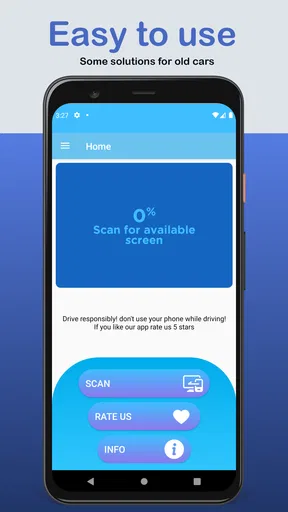
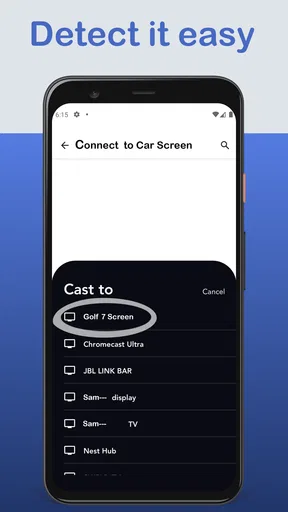
In practical terms, I would approach it as a connection helper. The useful moment is before a journey: open the app, prepare the phone and vehicle, and check whether the car display recognizes the connection. Once the link works, the larger screen can be more comfortable to view than the phone held in a dashboard mount. That can be helpful for passengers, demonstrations, or a parked-car setup where showing phone content on the vehicle display is the main goal.
The best part is the simplicity of the concept. There is no need to learn a large collection of unrelated tools. The app’s purpose is easy to understand, and that makes it less intimidating than a broad vehicle companion application filled with settings that may never be used. For someone who already knows that their car supports a compatible mirroring method, the app gives them a focused place to begin.
I also like that it can be considered before spending money on extra hardware. A person who is unsure whether a phone-to-car display workflow is useful may prefer trying a free app first. That does not guarantee compatibility, but it lowers the cost of experimenting. The app’s audience size suggests that this is not an obscure idea: it has passed fifty thousand installs and holds an average rating of 3.8 from more than five hundred ratings. I read that as evidence of moderate usefulness rather than universal reliability.
A realistic trip where it makes sense
Imagine preparing for a weekend drive in a vehicle with a compatible dashboard screen. I would test the connection at home or while parked, before loading the car. If the display appears correctly, I could use the larger view for a passenger’s phone-based content or for checking a route without repeatedly picking up the handset. The important habit is to complete the setup while stationary, not at the start of a busy road.
Worth Reading Before You Choose

Flipboard Shows What News Apps Must Do Beyond the Feed

Switching to Android Auto Means Rethinking Your Driving Routine

Google Calendar Makes a Crowded Week Easier to Manage

Ludo King Makes the Most of the Minutes Between Plans

Baby Panda World Brings Quick Play to Modern Phones, but Its Game Library Feels Busy

ESPN’s Live Game View Makes Following Close Games Easier
This workflow also reveals one of the app’s less obvious strengths: it encourages you to treat mirroring as a setup task rather than something to troubleshoot while driving. I would keep the phone unlocked during the initial connection, verify that the vehicle is showing the expected image, and then secure the phone where it cannot become a distraction. If the car is being driven, the driver should rely only on functions that are legal and safe in that vehicle and location.
Another useful scenario is a quick demonstration. If I wanted to show a friend how a phone behaves on a car display, a dedicated mirroring tool is easier to explain than a collection of unrelated casting or remote-control apps. It gives the conversation a clear starting point: connect the phone, check the vehicle display, and decide whether the result is useful enough for regular trips.
Where the experience becomes less predictable
The main weakness is compatibility. Screen mirroring is not controlled by the app alone. The phone’s Android version, the vehicle’s infotainment system, the cable or wireless connection, and the car manufacturer’s restrictions can all affect the result. Because of that, a successful installation is not the same thing as a successful connection.
This is where I would keep expectations realistic. The app should not be treated as a universal unlock for every dashboard. If a car does not support the relevant mirroring approach, an app cannot necessarily add that capability. Some vehicles may display only approved applications, some may require a wired connection, and others may behave differently depending on the phone model. Those are practical boundaries of the whole setup, not problems that can always be fixed by tapping another option.
The interface may also feel more functional than polished. A focused utility does not need the visual depth of a social or media app, but connection tools benefit from clear instructions and immediate feedback. When a display does not appear, users naturally want to know whether the issue is the phone, the vehicle, the cable, or the connection mode. If the app does not make that distinction obvious, troubleshooting can become trial and error.
My advice is to test one variable at a time. First check that the phone is recognized by the car. Then try the connection again with the vehicle parked and the phone’s screen active. If a cable is involved, use the same cable and port that already handle reliable phone connections rather than changing several things at once. This is a small but important tip: changing the phone, cable, and car settings simultaneously makes it nearly impossible to identify what solved the problem.
What it is not a replacement for
I would not compare this app directly with a full navigation application, a manufacturer’s official vehicle companion, or a dedicated infotainment platform. Those alternatives may offer deeper integration, route guidance, voice controls, media handling, or vehicle-specific support. Mirror Link Phone Car Screen has a narrower job: helping present phone content on a compatible car display.
That narrower focus can be an advantage when all I need is mirroring. It can also be a disadvantage if I expect one installation to manage every part of a drive. Someone seeking dependable navigation should choose a navigation solution designed for that purpose. Someone wanting vehicle diagnostics, maintenance reminders, remote controls, or manufacturer support should look at the official car application instead. Someone who mainly wants music may find a standard audio connection simpler and less distracting.
There is also a safety trade-off. Seeing a phone screen on a dashboard can be more convenient than holding the phone, but mirroring more content does not automatically make driving safer. Notifications, video, messages, and other distracting material can still pull attention away from the road. I would use the app only with the car parked during setup and would avoid treating the larger display as permission to interact with the phone while moving.
Small setup choices that improve the result
One practical tip is to prepare the phone before connecting. Close apps that are not needed, reduce unnecessary notifications, and make sure the display is awake during the first attempt. This does not change the app’s capabilities, but it removes several common sources of confusion. If the car shows an unexpected screen, I can then tell whether the problem is the connection itself or the content being sent.
A second tip is to test the exact journey conditions. A connection that works in the driveway may behave differently once the phone is moved, the cable is bent, or the vehicle starts moving. I would perform a short parked test with the phone in the position where it will remain during travel. This helps reveal whether the setup is stable enough for everyday use without turning the first real trip into a troubleshooting session.
A third trade-off concerns convenience versus control. Mirroring can make the phone’s content larger, but it may also expose more of the phone than I actually need. For regular driving, I prefer a limited, purpose-built interface when one is available. I see this app as most valuable for occasional display sharing or for vehicles where a compatible mirroring workflow is already part of the owner’s routine, not as my first choice for every dashboard interaction.
Who should install it
I would recommend trying it to Android users who already have a car screen that supports phone mirroring and who want a free, focused way to explore that connection. It is also suitable for people using older Android devices, since the minimum operating-system requirement is Android 4.4. The Everyone rating makes it broadly approachable for households, although responsible adult supervision and safe in-car use still matter.
It is a particularly sensible experiment for a passenger, a car owner testing a newly purchased vehicle, or someone comparing the built-in screen with the phone experience. The cost is low because the app is free, and the setup can be evaluated without committing to additional accessories immediately.
I would skip it if the car has no compatible display connection, if the goal is advanced vehicle control, or if a reliable official platform already does everything needed. I would also avoid making it the centerpiece of a driving routine if the connection is inconsistent. A screen that works only after repeated reconnecting may be acceptable for occasional demonstrations, but it becomes frustrating when every commute begins with troubleshooting.
My final assessment
Mirror Link Phone Car Screen succeeds when its role is kept clear. It is a free utility from AIOO inc that can help compatible phones and car displays work together, and its focused purpose is easier to understand than a feature-heavy vehicle app. The current version, 6.0, shows that the project has continued beyond its original release, while the rating of 3.8 indicates a mixed but respectable experience among users.
My recommendation is to try it only after confirming that the phone and vehicle are suitable for mirroring, then test everything while parked. If the connection works reliably, the app can be a convenient addition for passengers, demonstrations, and selected dashboard workflows. If what you really need is navigation, official vehicle integration, or a distraction-free driving interface, another option will probably serve you better.
The clearest reason to choose it is simple: it offers a low-cost way to test phone-to-car screen mirroring without pretending to be an entire infotainment system. I would keep it in the “worth trying for a compatible setup” category, with the understanding that the car and phone ultimately determine how useful the experience becomes.
Before relying on it for a regular commute, I would also ask whether the phone can stay out of reach once the car is moving. If using the mirrored screen still means reaching over to dismiss alerts or change what is displayed, the arrangement may not improve the drive. For a passenger-controlled screen or a parked demonstration, that trade-off is easier to accept.
People often wonder whether a car screen that already supports a familiar phone platform needs this app at all. I would start with the vehicle’s built-in option and use this only if the specific mirroring route is compatible and useful. The same goes for cables: there is no universal cable fix for an unsupported car, so buying accessories before testing the existing connection is a poor first step.
The app’s release date, October 14, 2021, places it among established utilities rather than a brand-new concept. That history does not tell me how any particular car will behave, but it does make the modest user rating worth taking seriously: I would go in with practical expectations, not assume a flawless plug-and-play experience.
For me, the most sensible decision is to test it once with the exact phone and vehicle I plan to use, then keep it only if the connection is straightforward enough to repeat. That quick, stationary trial answers the question that matters more than general claims: does this particular setup make the dashboard more useful without adding hassle or distraction?
Pros
- Simple way to mirror compatible phone content on a car display.
- Useful for accessing navigation apps while driving.
- Can make music and hands-free calling easier to control.
- May work with existing vehicle screens without extra hardware.
- Reduces the need to handle the phone while on the road.
Cons
- Compatibility varies widely between phones
- cars
- and cable connections.
- Some features may require a paid upgrade or additional permissions.
- Mirrored apps can appear stretched or poorly scaled on some screens.
- Connection stability may drop when the cable or wireless signal is weak.
- Using unsupported apps while driving can create safety and distraction risks.
FAQs for Mirror Link Phone Car Screen
What is Mirror Link Phone Car Screen and what does it do?
Mirror Link Phone Car Screen is designed to mirror compatible smartphone content on a vehicle’s display, allowing drivers and passengers to access selected navigation, media, calls, and messaging features through the car screen. During testing, its usefulness depended heavily on the phone, vehicle head unit, cable, and supported connection standard. It is not a universal solution for every car or smartphone.
Is Mirror Link Phone Car Screen compatible with all Android phones, iPhones, and vehicles?
No. Compatibility can vary considerably. The app may require a particular Android version, USB connection, wireless capability, or support from the vehicle’s infotainment system. Many newer cars rely on Android Auto or Apple CarPlay rather than the older MirrorLink standard, while iPhone support may be limited or unavailable. Check the app listing, your phone model, and your car manufacturer’s compatibility information before downloading.
How do I connect my phone to the car using Mirror Link Phone Car Screen?
The usual process is to install the application, grant the requested permissions, enable the appropriate connection setting on the phone, and connect it to the vehicle using a compatible USB cable or supported wireless method. The car’s infotainment system may also require MirrorLink or screen-mirroring mode to be selected manually. If the connection fails, restarting both devices and using a high-quality cable can often help.
Can I use navigation, music, calls, and messages while Mirror Link Phone Car Screen is connected?
The available functions depend on the vehicle, smartphone, operating system, and connection method. Navigation and music are commonly the most practical features, while calls and messages may require additional permissions or support from the car system. Some phones restrict full screen mirroring for safety reasons, and certain applications may not appear on the vehicle display. Always configure destinations and playlists before driving.
Is Mirror Link Phone Car Screen safe and free to use?
The application may be free to download, although some versions can include advertisements, optional purchases, or device-specific limitations. Safety depends on using it responsibly: drivers should avoid interacting with the phone while moving and use voice controls or pull over when necessary. Review the permissions requested by the app, especially access to contacts, notifications, storage, and location, before accepting them.


